在机器人控制装置中设定IP地址
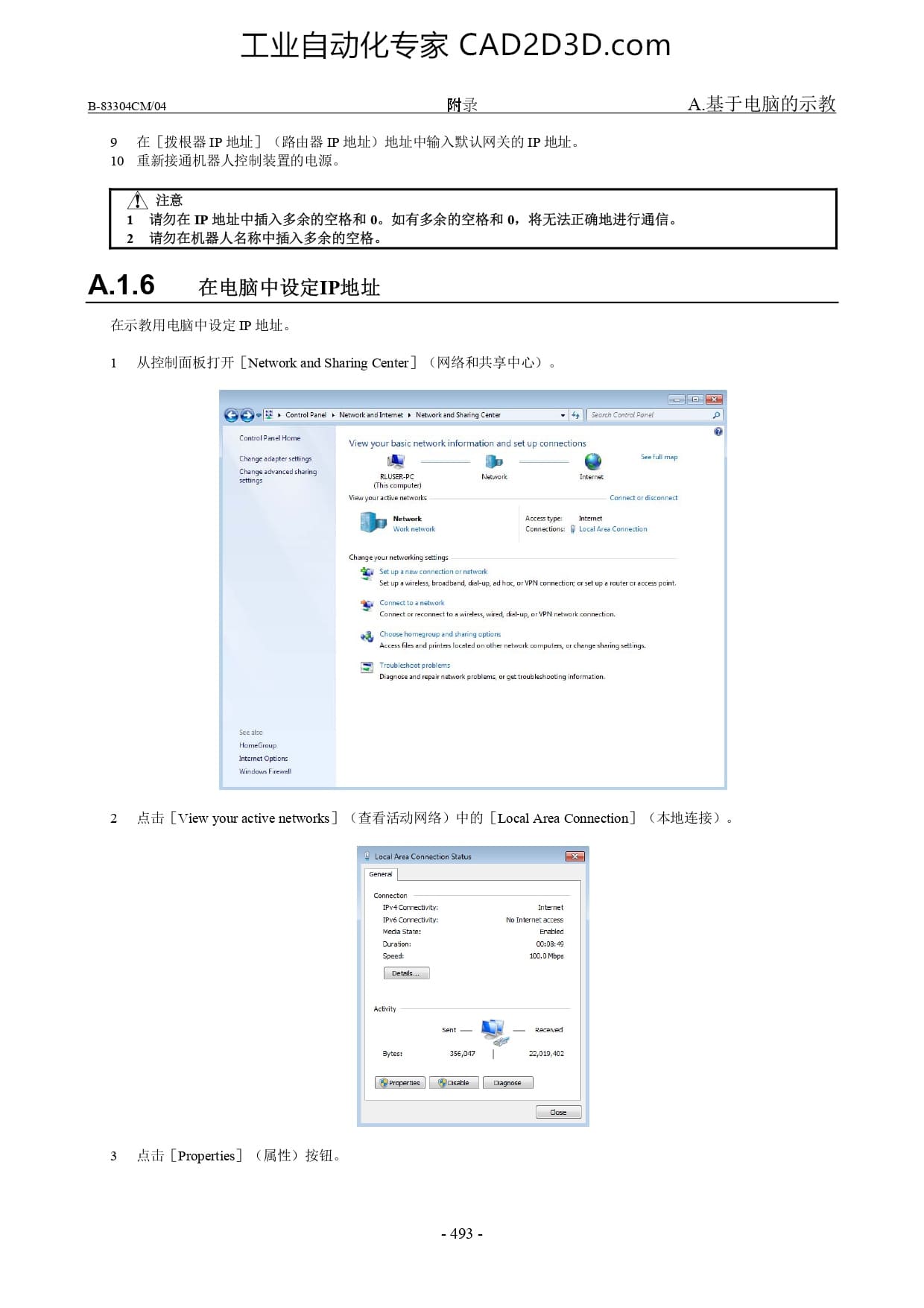
工业自动化专家 CAD2D3D.com 附录 A. 基于电脑的示教 B-83304CM/04 o ff (MR IP kL] (B 0 ikl Shhk el NBRINIGH) TP duhk . 10 重新接通机器人控制装置的电源 A.1.6 在电脑中设定 IP 地址在示教用电脑中设定耳地址 1 从控制面板打开[Network and Sharing Center]网络和共享中心 ) G comotpas tmmsitene Neorcassnng v [][5 中 ee View yourbasic networkinformation and setup connections hengeadaptersethngr Y Y @ Sop RLUSERPC Newark nteme s compute Vi outactie networks Connector diconnect Hetwork Accemtpe memet Wk netwark Comections: Loca tves Connection Change you etwarking st ornetwark A e upanecomn Sopwindess broedband dup edhoc orypN cornectorc orsetuparouterereccs paint ice wired dhup arypN nmerk conechan 网 Gaoeehemeaoupandannacpiam s e e i ot o e etk computmms rchenge sheing seingv [ Trublehcatpobiens pagneseandrepairnawetk ploblems orgetioubleshooang nlonmatien 2 点击[View your active networks] (查看活动网络 ) 中的[Local Area Connection]本地连接 ) Comecten P Carectrty et 6 Correctiy: miernetacress Neaa share [ Sursion oo Speed 100.0Mbpe == cvi 一 ae yn 356om | 0t402 Grroperos | [ @ocaie |][Daoee 3 点击[Properties]属性 ) 按钮 -493 -

 本站所有资源一键获取,含3D模型、设计软件和案例视频等
 支付宝现金红包,又疯狂“大面积”送钱了!人均 1-20 元 (无套路/每天能领)